
What NDOC Busted Mugshots Show
The state agency behind these records is the Nevada Department of Corrections. Its job is prison custody, so the locator covers only that system. It is not an arrest list. Nevada's 17 counties each run their own jails, and those booking files stay separate. Someone can be arrested, booked, and released without ever drawing a prison sentence. That person would never appear here.
The NDOC Offender Search is where a state-custody check starts. The form offers a name-based route plus an Offender ID field. A note there advises a supported browser for viewing inmate photos. Links lead to data groups covering demographics, aliases, booking, parole, and release. All of that helps when checking an NDOC profile. None of it turns the locator into a live county booking feed. Nor is it a court docket.
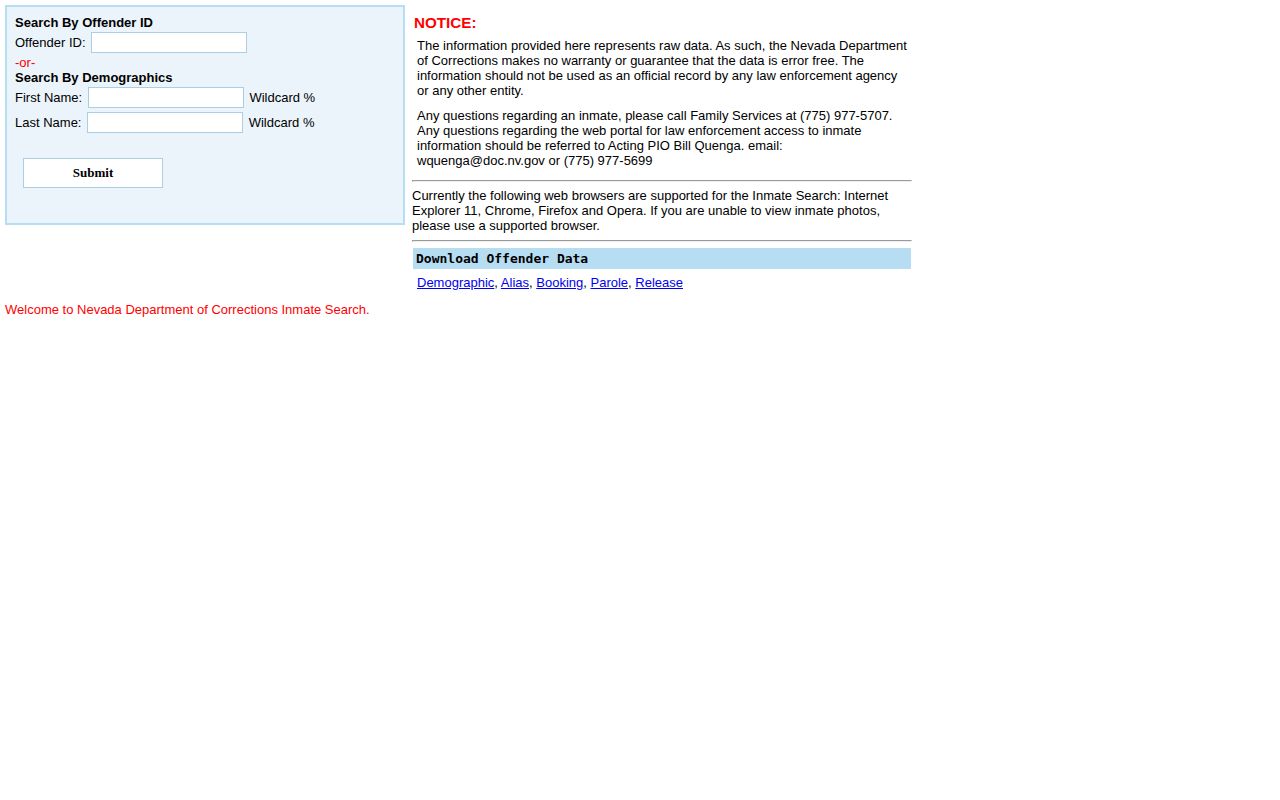
What the screenshot displays is a set of search controls, not a gallery. When a photo does appear, it belongs to the state record. It is an NDOC offender image. The county booking photo is a different document from a different agency. Unless the record itself proves that origin, treat the two as separate.
Find NDOC Mugshots and Profiles
For a state lookup, go straight to the state's form. It accepts an Offender ID or a demographic search on first and last name. The form even notes that a percent sign works as a wildcard. Wildcards widen the net. So begin with the best spelling you have and broaden only if the first pass comes up empty. A loose pattern can pull back several people with similar names.
Keep each step tied to the source. Open the official form. Search with the strongest identifier available, and read the profile in full before trusting the result. The page itself warns that its data carry no warranty and no guarantee of accuracy. So treat what you find as a pointer toward NDOC information. It is not a court record or final proof of identity.
- Open the NDOC offender locator. If an NDOC number is known, use that field first.
- If no number is available, enter a first and last name. Check spelling before broadening the search.
- Use the percent sign only when a partial name or spelling variation makes an exact search unhelpful. Review every result separately.
- Compare the displayed name and other identity details, aliases, custody or facility status, and release information. A shared name alone is not a match.
- Open the profile and note the date checked. State, parole, and release information can change.
- If a photo does not load, follow the form's supported-browser guidance. Do not infer that no image exists from a display problem.
Results can be incomplete or stale. A blank return is not the last word. Try the spelling again, recheck the identifier, and contact NDOC when the question concerns a state record. An empty search does not prove a person was never in state custody; it may simply mean the locator is not returning that record, the public view shifted, or another agency holds the file.
Read an NDOC Offender Profile
Reading a profile works best when identity fields stay separate from custody fields. The form organizes its data into groups for demographics, aliases, booking, parole, and release. Some profiles carry a photo. Others carry none. Before deciding a result belongs to the right person, compare several fields, including any NDOC number shown.
Every field here describes the corrections layer. Booking marks an intake. Parole means supervised release under conditions. A release entry may point to a later custody event, yet it does not explain a court's final ruling on its own. Take the labels as the agency writes them, and ask NDOC directly when an entry seems unclear rather than relying on a third-party summary.
| Search detail | How to read it |
|---|---|
| NDOC identifier | Use the agency number to distinguish people with similar names when it is available. |
| Name and demographic details | Compare the details shown on the result; do not rely on a name alone. |
| Aliases | Review alternate names as profile details, not as proof that a separate record belongs to the same person. |
| Facility or status | Read the current custody label and check when the page was viewed. |
| Booking data | Use the agency's own category and record context. Do not assume it is the county intake entry. |
| Parole and release data | These categories can help explain custody changes; confirm a legal disposition with the court. |
| Photo | If present, call it an NDOC offender photo. Availability is not promised for every profile. |
The form also links data downloads for these categories. Those files report what the state locator says. They are not certified case dispositions. A downloaded release row cannot reveal whether a county charge was dismissed, amended, or resolved in some way only the court docket records.
When NDOC Busted Photos Change
When can you expect a new busted photo? The locator has no fixed answer. It anticipates that images may not display, and it points users to a supported browser when that happens. So the system can carry a photo, but timing and availability stay record-specific.
Administrative Regulation 120, dated June 17, 2012, covers inmate identification photos. Under that rule, such photos are public information if available. The back of the photo ID is not public, except as the rule provides. NDOC also will not retake a current photo just to give one to the media. That copy may or may not remain current, so confirm the applicable rule with NDOC before relying on its details. Neither the public form nor the regulation sets a regular refresh schedule.
A web display can change without any new photo being taken. An image may load in one browser and fail in another. An agency may also update a profile after a custody change. The locator does not explain such events in detail. When an image or a profile detail matters to you, save the date of your search. Then ask NDOC whether a record exists and whether the public copy is current.
Former Offenders in NDOC Search
The public locator has no clearly labeled former-offender filter. It does expose release data. A profile can even stay visible after custody changes. None of that proves every former offender remains searchable forever. The form also never says a profile vanishes the moment someone leaves NDOC custody. It never says an image does either. There is simply no universal rule stated anywhere on it.
So describe former-offender visibility with care. A person may show up in release data yet no longer appear in the name search. Another profile may sit there with a release entry attached. Photo access can differ from profile access too. When the locator leaves your question unanswered, ask NDOC about that specific record. Never build a statewide retention rule from a single result.
Online visibility is not legal retention. NDOC can keep a record under its own schedule. That record may persist long after the public form stops returning it. A dated search helps keep these things straight. But it cannot replace a written agency response or a court disposition.
County Busted Mugshots vs NDOC
A county booking photograph belongs to a local arrest and intake record. An NDOC photo belongs to a state corrections profile. One person might have both images online, only one, or neither. A county can hold a booking record yet display no photo, while NDOC may show an offender photo after a later prison sentence. Different custody stages, different record custodians.
Match the source to the question. For a recent arrest or a county jail stay, start with the arresting agency or the local lockup, since county feeds differ in scope, photo policy, and update window. The Nevada County Directory routes a search to the right local coverage. For a state-prison profile, use NDOC. Federal or immigration custody lives in separate locators and never appears in an NDOC result.
| Record layer | What it answers | Where to confirm |
|---|---|---|
| County booking record | Whether a local agency recorded an arrest or jail intake, subject to its public access rules. | The arresting agency, county jail, or local records unit. |
| NDOC offender profile | What the state corrections locator shows about the state-custody profile and release data. | The official NDOC search and NDOC records staff. |
| Court case record | The filed case and its later events or disposition. | The court that handled the case; court systems are not one statewide jail roster. |
A county booking photo traces to a local arrest record. An NDOC photo traces to a state corrections profile. The two custodians are separate.
How to Request NDOC Records
When the locator shows no state record, NDOC's records office is the next stop. Its instructions route requests to the Offender Management Division. The published contact route lists omdrecords@doc.nv.gov. Mail goes to Attn: Offender Management Division, Nevada Department of Corrections, P.O. Box 7011, Carson City, NV 89702. Verify current contacts and forms on the NDOC Records and Information page before sending anything.
A clear request names the person. It adds the NDOC number if known, identifies the exact document or photo, and narrows the date range. Ask for something that already exists, like a profile photo or a particular release record. Do not assume NDOC holds any county booking photograph. Another agency created that image, so contact that agency instead. Precision helps the office find the right record rather than build a new report.
- Identify the subject and include an NDOC number if one is known.
- Name the record sought, such as an existing profile photo, booking record, parole record, or release record.
- Give a date range or other details that distinguish the record, and ask for inspection or a copy.
- Use the current NDOC form and instructions. Ask the office about any estimate before agreeing to charges.
- Keep the request and response together, including any notice that another agency holds the record.
NDOC handles requests for its records under Nevada's Public Records Act, NRS Chapter 239. The law sets a clock. An agency must answer by the end of the fifth business day. That answer can take several forms. It may let you inspect or copy the record. It may also hand over a copy, name the true custodian, or send written notice with the earliest reasonable date for availability. Don't confuse that first reply with delivery. A record can still need review, redaction, clarification, or extra time to produce.
NDOC's published fee schedule lists 15 cents per page for copies. Removable media runs at actual cost. Extraordinary staff time may carry a charge too. Advance payment applies when an estimate crosses the listed threshold. Those are NDOC's own numbers, not a statewide photo price, and fee pages change. Before filing, check the current NDOC public-record fees and the NDOC public-record request form.
Some information can stay behind. A law, a policy, or a court order may require it. The office should say which basis applies whenever it withholds or redacts material. Asking for one record does not guarantee that every field, image, or related document comes out. If the reply says NDOC does not hold what you want, ask which agency is the custodian. Then send a separate request there.
Keep Custody and Court Records Apart
NDOC's search works well for state-custody information. It falls short elsewhere. The tool does not report every arrest or every jail roster. It also leaves out court results in Nevada. County jail data moves on its own schedule. A person can be released, transferred to another authority, or sentenced later. That release field on a profile is a corrections data point, nothing more. It is not a case history.
Accurate answers come from matching each record to its holder. Start with the county jail or arresting department for local intake. Turn to NDOC for a state-prison profile. Go to the court clerk or court search for a filed case. That office holds its final disposition too. Dates and labels make sense only in their own context.
Treat an NDOC mugshot search as a first step toward a possible state-corrections profile. Check names and identifiers with care. Contact the agency when a record stays unclear. The official search shows what NDOC currently exposes. Its own data notice urges confirmation of important details with the record holder.